How to stop sending personal data to ChatGPT
Everything you type, paste or upload into ChatGPT or claude.ai is sent to the provider's servers. If a customer's name, email or account number is in it, that goes too. Here are three ways to keep it out, and how to check what actually left your browser.
Updated 28 September 2026 · Serkan Korkut
What actually gets sent
When you press send, the page posts one request with the full text of your message, and the text of any file you attached. You can see it yourself:
- Open DevTools with
Cmd+Option+Ion a Mac orF12on Windows, and go to the Network tab. - Send a message with a made-up email, such as
jane.doe@example.com. - Click the
conversationrequest on chatgpt.com, orcompletionon claude.ai, and open its payload.
What you see there is what the provider received. How long it is kept, and whether it is used to train models, depends on your plan and your data settings. Masking means the real values are never in it in the first place.
Three ways to keep it out
| Approach | How it works | Trade-off |
|---|---|---|
| Remove it by hand | Delete names and numbers before you paste | Slow, and easy to miss one at the end of a long day |
| Company gateway | All AI traffic goes through a server that filters it | Needs IT to run it, and adds a server that sees your data |
| Mask in the browser | Personal data becomes placeholders before the request leaves | Pattern based, so it only catches what it can recognise |
Mask it automatically with mask2ai
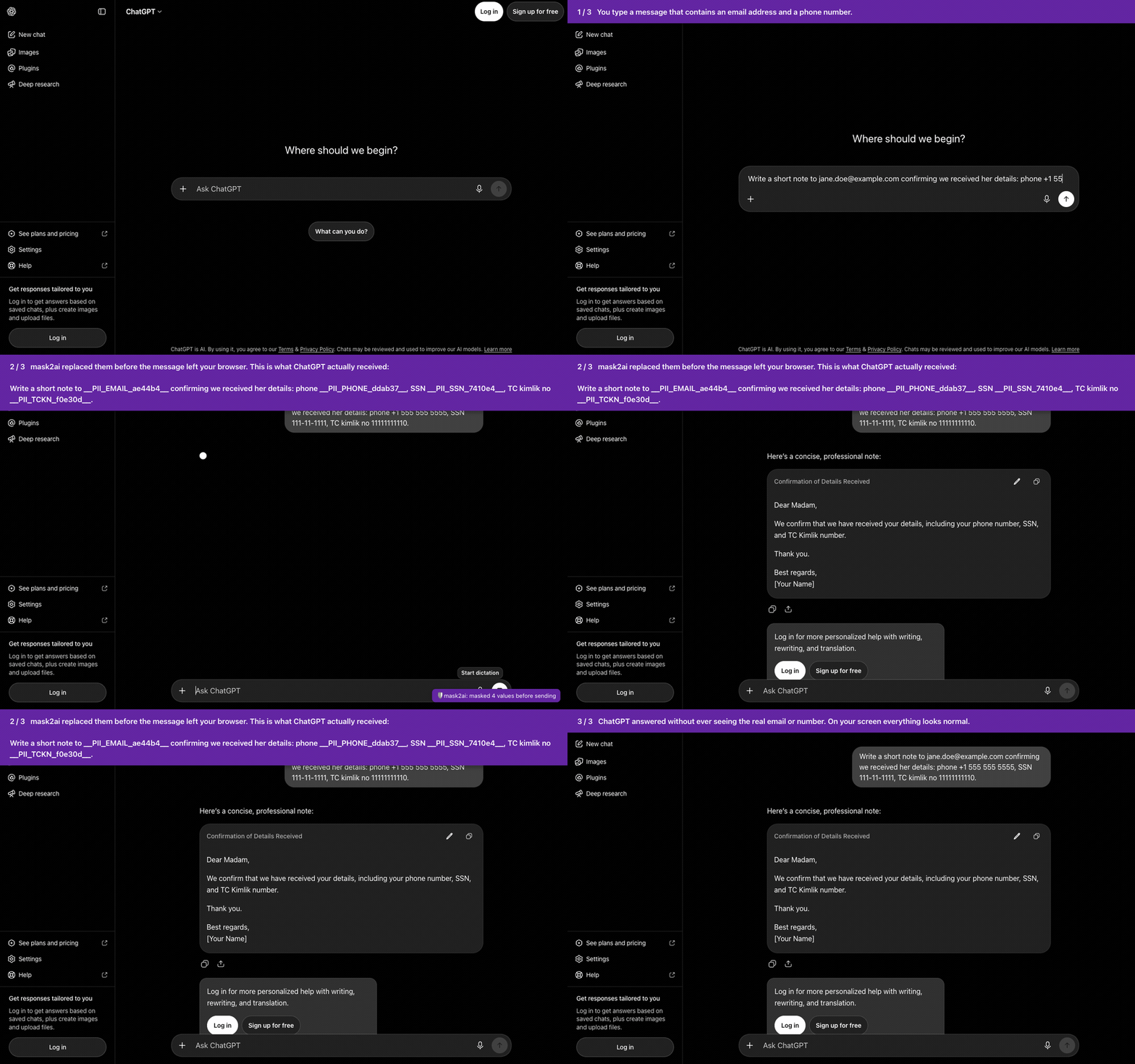
mask2ai is a free, open source ChatGPT PII redactor: a Chrome extension for chatgpt.com and claude.ai. Before your message is sent, PII masking replaces personal data with placeholders. The model answers around the placeholders, and the page shows you the real values.
You type:       Email jane.doe@example.com and confirm her phone +1 555 555 5555
ChatGPT gets:   Email __PII_EMAIL_ae44b4__ and confirm her phone __PII_PHONE_ddab37__
You see:        the reply, with jane.doe@example.com and +1 555 555 5555 back in place
Until the Chrome Web Store listing is live, load it from the repository:
git clone https://github.com/serkankorkut/mask2ai.gitThen open chrome://extensions, turn on Developer mode, choose Load unpacked and select the mask2ai folder. A "mask2ai: on" notice confirms it on claude.ai and chatgpt.com. Send the made-up email again and check the payload in the Network tab: only the placeholder is there.
What it recognises
- Email addresses and phone numbers in international, US, UK and Turkish formats.
- Payment card numbers with a Luhn check, and IBANs with a mod 97 check.
- US social security numbers and Turkish TC kimlik numbers with their checksum.
- Dates of birth, passport and ID numbers after a label such as
DOBorpassport no. - Names and street addresses when a label, title or cue is nearby, or when a matching email was found.
- Word, Excel, PowerPoint and text file uploads on claude.ai, masked inside the file.
It does not catch a bare name with no cue around it, or health, religion or income written in prose. PDF and image uploads in the browser are not inspected, and a notice tells you so. The full list is in the docs.
Questions
Does ChatGPT keep what I paste?
Your messages are sent to and processed on OpenAI's servers. How long they are kept and whether they are used for training depends on your plan and your data controls. If the personal data was masked before sending, it is not in what they keep.
Is masking the same as anonymization?
Not quite. Replacing values with placeholders you can map back is pseudonymisation. It removes the real values from what the AI sees, but the mapping still exists on your machine.
Does masking make it fine to use ChatGPT with customer data?
It reduces what you share, which helps. It does not decide on its own whether a use is allowed under GDPR, KVKK or your company's policy. Check that with whoever owns data protection where you work.
Does it work with file uploads?
On claude.ai, text files and Word, Excel and PowerPoint files are masked inside the file before upload, with formatting untouched. PDF and image uploads are not inspected in the browser.